How to Screen Mirror or Cast from iPhone to Sony TV
58 View

- Publish Date:
- August 8, 2024
- Category:
- Future Tech Now
- Video License
- Standard License
- Imported From:
- Youtube
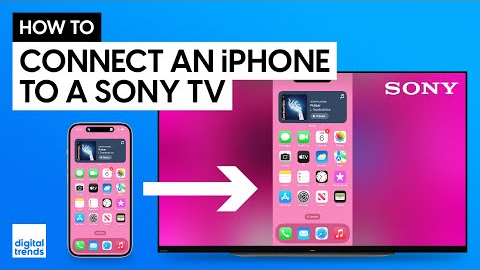
We provide a step-by-step guide on how to screen mirror and cast from your iPhone to a Sony TV. We begin by showing you how to ensure your TV is ready for AirPlay, starting with checking and enabling AirPlay settings. This involves navigating through the TV's system menu to verify the device name and turning on AirPlay in the "Apple AirPlay and HomeKit Settings." We also explain how to connect both your iPhone and TV to the same Wi-Fi network, a crucial step for seamless mirroring.
Once everything is set up, we walk you through the process of screen mirroring, allowing your iPhone’s display to appear on the TV. We also clarify the difference between screen mirroring and casting, highlighting that screen mirroring displays everything on your phone, while casting allows you to play content on your TV while using your phone for other tasks.
To illustrate casting, we use Netflix as an example, showing how to log in, find content, and use the cast icon to stream directly to your TV. This method offers a more private and distraction-free viewing experience.
MORE GUIDES ON CONNECTING YOUR PHONE TO TV
https://www.digitaltrends.com/home-theater/how-to-mirror-a-phone-on-your-tv/
MORE HOW TO VIDEOS
https://www.youtube.com/playlist?list=PLZEIwIHCxaFWxNMwajRgH7uUVqATn7aCN
VIDEO CHAPTERS
00:00 Intro
00:22 Sony TV Settings to Screen Mirror or Cast
01:45 How to Start Screen Mirroring
02:27 How to Start Casting from iPhone to Sony TV
NIT-NERDS MERCH AVAILBLE HERE!
https://my-store-e80770.creator-spring.com/
BEHIND THE SCENES
https://www.youtube.com/watch?v=sFZ661IZdxQ
https://www.youtube.com/watch?v=y0WVRjSATWw
SUPPORT OUR PARTNERS
Each of the partners listed below has been integral in helping our channel continue to grow. We love their products and think you will too, please help support them by checking out the links below.
🤝 BDI Elements Media Console: https://bit.ly/44sBo7s
🤝 BDI Reveal Coffee Table: https://bit.ly/3R5q79M
🤝 BDI Serif Side Table: https://bit.ly/3R5pZHk
🤝 Acoustic Treatment: http://www.acousticservices.info/
🤝 Artlist Music: https://artlist.io/referral/142302/Digital
🤝 RØDE Wireless Pro: https://brandstore.rode.com/products/wireless-pro?sca_ref=4584951.fVzTeSQa5y&sca_source=YouTube
🤝 RØDE NT5 Matched Pair: https://rode.com/en-us/microphones/studio-condenser/nt5?sca_ref=4584951.fVzTeSQa5y&sca_source=YouTube
🤝 Polk Reserve Series R600 Floorstanding Tower Speakers: https://amzn.to/3pWb9Il
SUBSCRIBE FOR THE LATEST VIDEOS
http://bit.ly/DTYouTubeSub
VISIT DIGITAL TRENDS
https://www.digitaltrends.com/
Digital Trends may earn a commission when you buy through links on our channels.
FOLLOW US!
https://www.facebook.com/digitaltrends
https://twitter.com/digitaltrends
https://www.instagram.com/digitaltrends
#streaming #sony #iphone #airplay #hometheater
By: Digital Trends
Title: How to Screen Mirror or Cast from iPhone to Sony TV
Sourced From: www.youtube.com/watch?v=u4UuWx-VTUE
Did you miss our previous article...
https://virallyfe.com/future-tech-now/11-cool-gadgets-2024-you-can-buy-on-amazon